
April 28, 20121 min read
Color Picker
The latest rendition of the Color Picker “Classic”, themed after Photoshop, GIMP, and other image editors, there are no frills here, it’s a basic Hue, Saturation, Luminance, and Alpha (HSVA) color selector. It works in b...

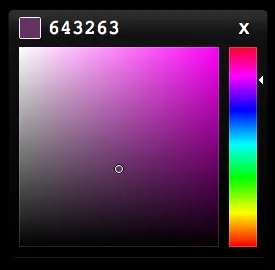
The latest rendition of the Color Picker “Classic”, themed after Photoshop, GIMP, and other image editors, there are no frills here, it’s a basic Hue, Saturation, Luminance, and Alpha (HSVA) color selector. It works in browsers that support the <canvas> element; Firefox 2+, Safari 3+, Opera 9+, Google Chrome, IE9+.
Configuration:
- size: how large the saturation/luminance area is.
- hueWidth: how large the alpha/hue area is.
- autoclose: makes picker self closing when clicking outside the box.
- color: input rgba() or #hex.
- callback: sends your color to your custom function.
- toggle(): true or false, to display and hide.
- update(): to change the color externally.
- eyeDropLayer: layer to grab colors from.
- eyeDropMouseLayer: layer to get events from when grabbing colors.
Basic implementation:
 picker = new Color.Picker({
	color: "#643263", // accepts rgba(), or #hex
	callback: function(rgba, state, type) {
		document.body.style.background = Color.Space(rgba, "RGBA>W3");
	}
});
picker.element.style.top = 220 + "px";
picker.element.style.left = 270 + "px";
You can find this project on Github.
Licensed under the MIT.